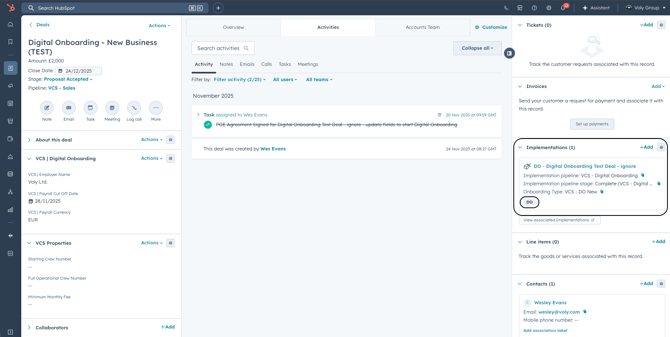
We have 5 separate Onboarding Types for Digital Onboarding, outlined below:
- VCS - DO New
- Deal Type - 'New Business'
- Sales Team - This is for any New Business being onboarded by VCS
- VCS - DO VCS
- Existing Client with VCS
- This onboarding type, will not need to go through the Deal process, as the deal already exists within VCS (outside of HubSpot).
- This is for existing clients with VCS being onboarded manually by the Implementation Team
- Existing Client with VCS
- VCS - DO workrest
- Deal Type - 'Cross Sales'
- Sales Team - an existing client using workrest who has been identified as a new sale for the VCS Product
- VCS - New User
- An existing client with VCS, with a new crew user joining the asset
- This onboarding type will not require a Deal being created, as the Deal will already exist
- An existing client with VCS, with a new crew user joining the asset
- VCS - Crew Leaver
- An existing client, with a crew user leaving the asset
- This onboarding type will not require a Deal being created, as the Deal will already exist
- An existing client, with a crew user leaving the asset
Business Units:
Voly Yachting
Departments:
Sales
VCS (Guernsey)
Deal Creation requirements and Set-up
This step is only required for Deal Types, New Business or Cross Sell
For VCS Deal Types that are either New Business (VCS - DO New) or Cross Sell (VCS - DO workrest), the Deal record must meet the required criteria for a Digital Onboarding record to be created. The criteria will include associations being added to the Deal and properties being updated within the Deal.
Below is a step-by-step guide on how to associate the relevant objects, within the Deal.
Deal Associations
PropertiesTask for VCS Guernsey Team
Deal associations - Contact
Once we have identified the main contact responsible for Digital Onboarding, we must associate them to the Deal and label them with "VCS Main Pay Roll". Below are the steps on how to do this:
Adding the Contact
Step 1:
Click Add + on the Contact association card
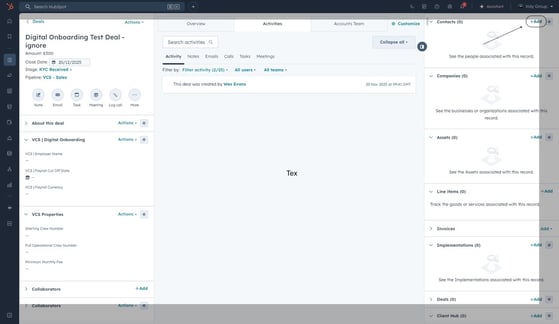
Step2:
Locate the Contact - Add Existing
if the contact needs creating, follow the steps here
Step 3:
Type in their name or email address to locate their Contact account
Step 4:
Select the Contact in HubSpot-jpeg.jpeg?width=661&height=384&name=ascreenshot%20(3)-jpeg.jpeg)
Step 5:
Click Next, then Save
Adding the Association label
Step 1: Click "Add Association Label"-jpeg.jpeg?width=670&height=389&name=ascreenshot%20(4)-jpeg.jpeg)
Step 2:
Search and Select the "VCS Main Payroll" Association Label, then select "Update"
***
Step 3:
Once saved, your contact will be labelled, as below:
Deal associations - Company
A Company must be associated with the Deal. Below are the steps on how to associate a Company.
Step1:
Click Add + on the Company association card-jpeg.jpeg?width=670&height=389&name=ascreenshot%20(6)-jpeg.jpeg)
Step 2:
Locate the Company - Add Existing
Step 3:
Type in the name to locate the Company account
Step 4:
Select the Company in HubSpot
-jpeg.jpeg?width=670&height=389&name=ascreenshot%20(5)-jpeg.jpeg)
Step 5:
Click Next, then Save
Deal associations - Asset
Step1:
Click Add + on the Asset association card
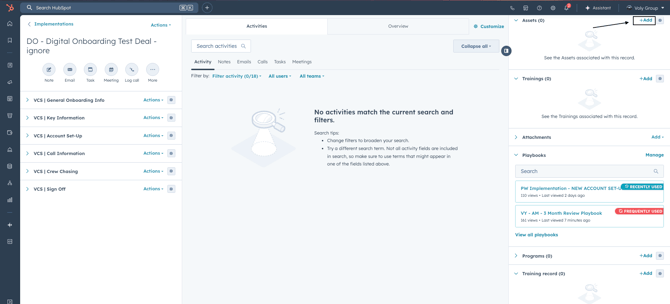
Step 2:
Locate the Asset - Add Existing
Step 3:
Type in the name of the Asset to locate the account
Step 4:
Select the Asset in HubSpot
-jpeg.jpeg?width=670&height=389&name=ascreenshot%20(7)-jpeg.jpeg)
Step 5:
Click Next, then Save
Deal Properties
The below properties will be required to be updated on the Deal, before the Implementationrecord is created.
- VCS | Employer Name
- VCS | Payroll Cut Off Date
- VCS | Payroll Currency
The properties can be found within the Deal, on the VCS | Digital Onboarding card: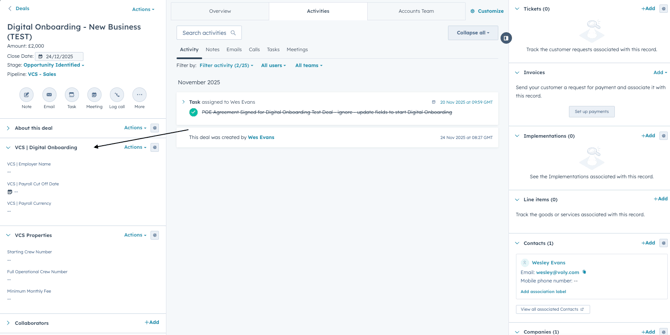
Reminders
When the Deal reaches the below stages, HubSpot will send out reminders to the VCS Team to remind them to update the properties, should the information be available:
- KYC Passed
- POE Agreement Signed
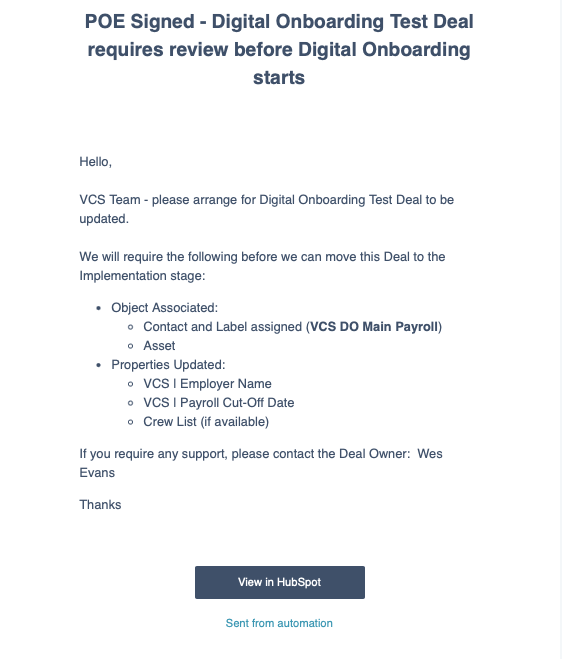
Deal Task
Once the Deal record is moved to the "POE Agreementy Signe" stage, a task will be created, as a final check to make sure that the properties above have been completed. This task will be assigned to the VCS Guernsey Team to complete.
Task email notification - click on the "ViewTask" icon at the bottom of the email, which will direct you through to the task on HubSpot, or if you would like to locate the task in HubSpot, you will need to go to the VCS Task Queue - here 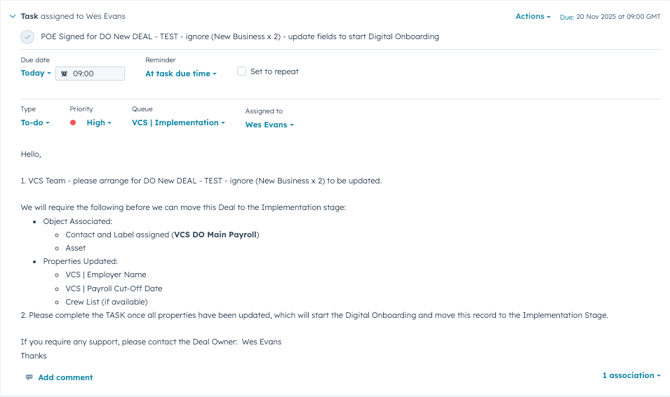
Once you have completed this task, this will move the Deal record into the Deal stage "Implementation" which will then create an Implementation Digital Onboarding record and a New Business Take On Record.
The records (once created) will be visible down the right column of the Deal, and associated within the Implementation Object, with the association label "DO".